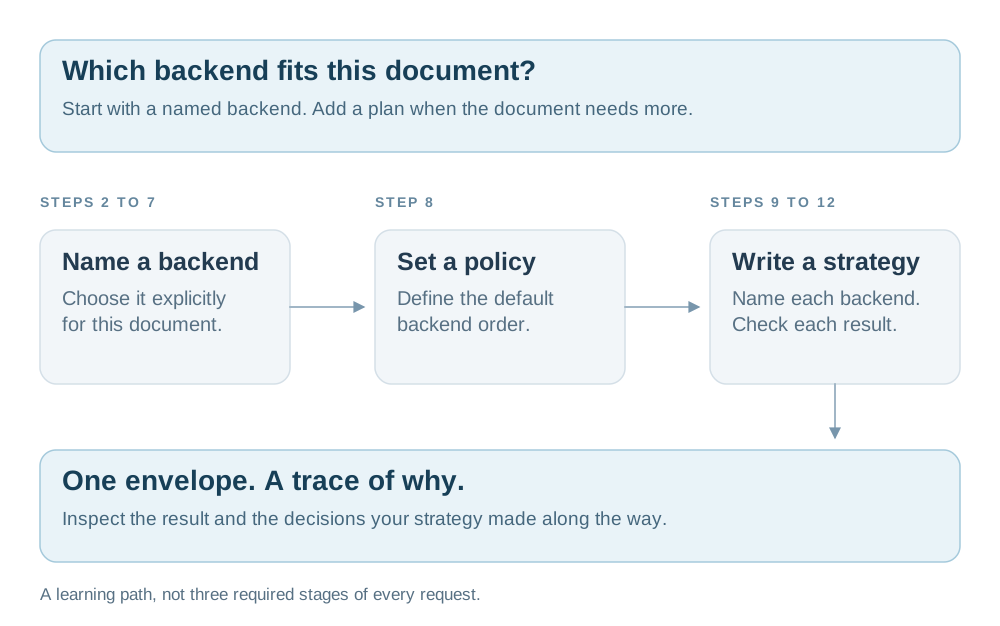
Start with one local parse. Build toward a strategy that knows when to try another backend.
Python 3.11+Local walkthroughVendor keys optional
Before you start
What you get. By the end of this page you will have parsed five example documents, watched two
backends disagree on the same page, written an openreading.yaml that keeps a document on your
own machine, built a strategy that escalates a scan to OCR by itself, run a whole folder in one
command, and served the same engine over HTTP.
After installation, the main walkthrough runs with two backends that need no key, account, or network.
Installation downloads dependencies, and the optional hosted-backend step needs a vendor account and network access.
A backend is the thing that does the reading, such as PyMuPDF on your machine or Reducto's hosted API. The two
local ones are PyMuPDF, which lifts a PDF's own text layer, and Tesseract, which renders each page
to a bitmap and runs OCR over the pixels. Every hosted backend is optional, and
step 14 shows how to add one when you want it.
The documents are the ones already in this folder. They are three United States tax forms and two
synthetic bank statements, and examples/README.md says where each came from. The
tax forms carry invented names and amounts. One of them is a scan with no text at all, and that
one document is the reason the second half of this page exists.
Use a fresh clone for this walkthrough, because later commands replace openreading.yaml and clean up generated files.
Work from the root of that clone, because every command names a path under examples/. The clone
root ignores *.json, *.yaml and *.pdf, so nothing you write here shows up in git status.
Step 17 provides cleanup commands and explains which files remain afterwards.
Now ask OpenReading what this machine can actually run:
bash
uv run openreading backends
You should see one row per backend, and the two local rows saying yes:
text
BACKEND                        TYPE               CONFIGURED  MISSING
anthropic-claude               hosted_api         no          ANTHROPIC_API_KEY, ANTHROPIC_MODEL
aws-textract                   hosted_api         no          AWS_ACCESS_KEY_ID, AWS_SECRET_ACCESS_KEY, ...
azure-document-intelligence    hosted_api         no          AZURE_DOCUMENT_INTELLIGENCE_KEY, ...
chunkr                         hosted_api         no          CHUNKR_API_KEY
docling                        oss_library        no          DOCLING_SERVE_URL
google-document-ai             hosted_api         no          GCP_PROJECT_ID, GCP_PROCESSOR_ID
google-gemini                  hosted_api         no          GEMINI_API_KEY
mistral-ocr                    hosted_api         no          MISTRAL_API_KEY
nuextract                      hosted_api         no          NUEXTRACT_API_KEY
open-ocr                       hosted_api         no          OPENOCR_API_KEY
pulse                          hosted_api         no          PULSE_API_KEY
pymupdf                        oss_library        yes         -
qwen-vl                        self_hosted_model  no          QWEN_VL_ENDPOINT
reducto                        hosted_api         no          REDUCTO_API_KEY
tesseract                      oss_library        yes         -
Each no identifies a missing key, endpoint configuration, package, or system binary. The MISSING
column names what you need, and step 14 adds a key. This tutorial
uses only the two yes rows, so you can read all seventeen steps before you sign up for anything.
The outputs below were captured with the locked Python dependencies and one Tesseract installation.
OCR text, confidence scores, block counts, comparison findings, and timings can vary across installations.
If tesseract says no, its MISSING column names the binary rather than a variable:
parse reads one document with one backend and prints one JSON envelope. The envelope is the
single response shape every backend returns. Start with the shortest document in the folder,
a one-page Schedule A:
bash
uv run openreading parse examples/schedule_a_2024.pdf --backend pymupdf > sa.json
You should see one line on your terminal and nothing else:
text
Consider using the pymupdf_layout package for a greatly improved page layout analysis.
That line is PyMuPDF's own advice, and it is not an error. It arrives on stderr, which is why the
redirect above left it on your screen and kept sa.json pure JSON. Three streams carry three kinds
of news on parse:
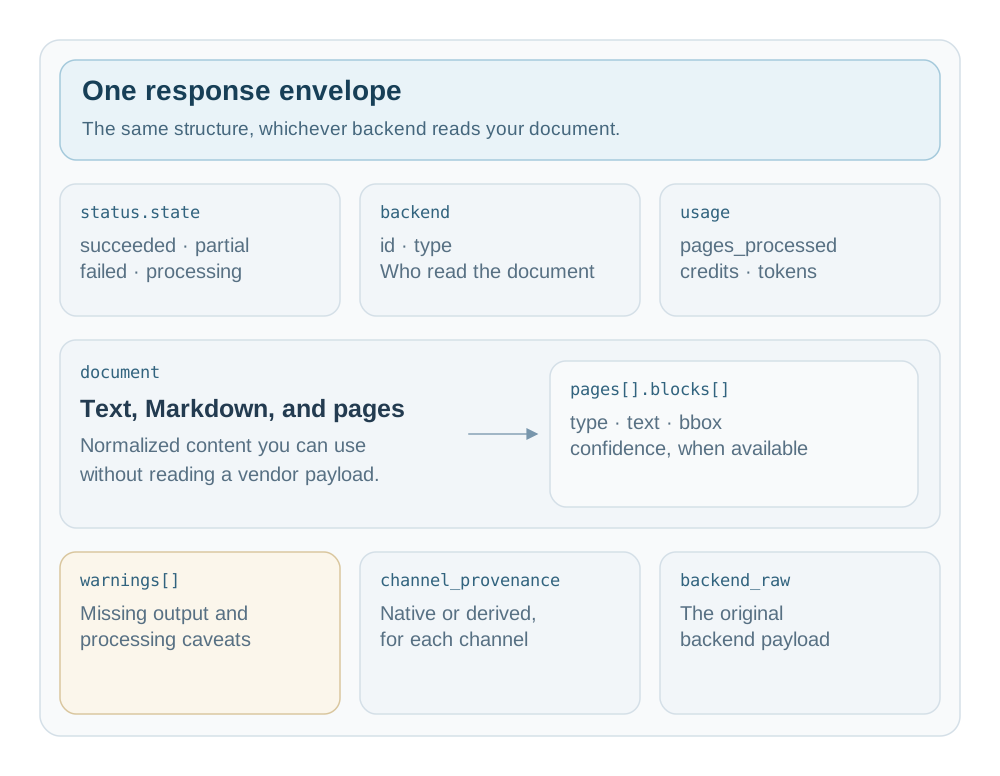
The response JSON is what your application builds against, whichever backend reads the document.
An envelope is one JSON object containing the reading, its outcome, and the context needed to interpret it.
Its field paths stay consistent across backends, but the available content and the extracted values can differ.
This chapter shows what you can consume, what you must check, and how to write one reusable consumer.
Open diagram at full size
A response you can build on
The Schedule A response from step 2 is already saved in sa.json for the table examples below.
For a compact first example, read the bundled synthetic bank statement and look at its first text block:
Here is that response shortened for reading, with the document structure kept around its first block.
Text and Markdown are reduced to their first line, and coordinates are rounded to four decimal places.
Other blocks, native coordinates, and the raw backend payload remain in your saved file but are omitted below.
The excerpt is valid JSON under the response schema, but it is not the entire reading.
json
{"schema_version":"0.3","status":{"state":"succeeded"},"backend":{"id":"pymupdf","type":"oss_library","output_paradigm":["block_tree"]},"document":{"text":"First National Bank","markdown":"First National Bank","page_count":1,"pages":[{"page_number":1,"width":612.0,"height":792.0,"unit":"pdf_point","blocks":[{"type":"text","native_type":"text","text":"First National Bank","reading_order":0,"bbox":{"x":0.0588,"y":0.0265,"w":0.2085,"h":0.0243,"page":1}}]}]},"usage":{"pages_processed":1},"warnings":[{"code":"confidence_unavailable","message":"PyMuPDF is a deterministic parser; per-element confidence does not exist","field":"block_confidence"}],"channel_provenance":{"markdown":"derived","text":"native","blocks":"native","block_bbox":"native","table_cells":"native"}}
Start with the outcome, move to the content, then read limitations and producer context.
status.state: succeeded means the operation completed, not that it read every word correctly.
The warning explains the absent confidence score, while the document still contains useful text and page structure.
schema_version: "0.3" names this JSON contract, not the version of the package you installed.
Choose the content you need
Your application needs
Read this path
Keep in mind
Plain text for search or analysis
document.text
Optional. An absent field and a present empty string mean different things.
Formatted content for display or model input
document.markdown
Can be native or derived. Sanitize untrusted content before rendering it as HTML.
Page elements and their reading order
document.pages[].blocks[]
Pages and blocks are optional. Only type is required on a block.
Structured tables
document.pages[].blocks[].table
Look for cells or rows, not aligned text that only resembles a table.
Named extracted values
typed_fields
A top-level map, not a member of document. Values can retain numbers, booleans, arrays, and objects.
Chunks linked to source content
chunks[]
Optional. Available block_ids connect chunks to source blocks.
Vendor-specific details
backend_raw.payload
Optional and outside the versioned contract. Prefer normalized fields for portable consumers.
Every response requires schema_version, status, backend, and document, but no individual text or page field is guaranteed.
At least one of document.text, document.markdown, document.pages, or top-level typed_fields must be present.
An extractor can therefore return document: {} with typed_fields, and a valid content field can still be empty.
Schema validation proves the agreed structure, not that the result contains enough information for your task.
These commands write available text or Markdown from the complete saved response, without copying a truncated documentation excerpt:
// empty produces no output for an absent field, which is useful for this inspection command.
Your application should check field presence before using that convenience to decide whether a reading is complete.
Read the outcome and limitations
Response state
What it tells you
What you do next
succeeded
The reading operation completed.
Inspect the required content and any warnings before accepting its quality.
partial
The response contains incomplete output.
Decide whether the available content is sufficient, while preserving its limitations.
failed
The response reports a failed operation.
Inspect available error details instead of treating it as a finished reading.
processing
The response is not a finished reading.
Follow the operation's completion workflow before consuming it.
Some failures produce no response at all: the CLI can exit nonzero with an empty redirected file.
Python can raise an exception, and an HTTP error body is not a parsed document envelope.
Step 16 shows how to handle those failures before reading JSON as document content.
A channel is one named kind of output, such as text, table cells, or block confidence.
channel_provenance records which channels this response produced and whether each was native or derived.
Native means the backend supplied the channel, while derived means core computed it from the backend's output.
This map is experimental, so check the content fields themselves when your application needs a particular output.
For PyMuPDF, the map includes native text, blocks, geometry, and table cells, with derived Markdown.
It has no block_confidence entry, and confidence_unavailable explains why no measured score was produced.
Warnings are not an exhaustive inventory of missing channels, and unfamiliar warning codes remain valid.
Preserve their messages rather than rejecting a useful response because a new warning code appeared.
usage reports available counters such as pages_processed, credits, input_tokens, and output_tokens.
It does not report a calculated dollar cost, and a missing counter means unreported consumption rather than zero usage.
backend.id names the producer, while backend.type describes its integration type without changing your consumer's field paths.
Pages, blocks, tables, and coordinates
A block is one unit of content on a page, such as text or a table.
The Schedule A you parsed in step 2 shows both kinds in one response:
Use type when choosing how to consume a block, and inspect native_type when investigating its original backend label.
reading_order is zero-based, while page_number is one-based in the original source document.
Page subsetting can preserve a source page number other than one, so do not substitute the array index.
The table exposes both a convenient grid and a cell representation for positions, spans, and available geometry:
Cell row and column positions are zero-based, and merged cells retain their row and column spans.
Covered positions in table.rows can contain null, so flattening the grid can discard information about merged cells.
For a quick human preview, inspect the table block's Markdown instead of rebuilding its layout yourself:
The origin is the page's top-left corner, with horizontal and vertical values expressed as fractions of its dimensions.
For example, x: 0.0584 places the table about 5.84% of the page width from the left edge.
Multiply x and w by the page width, and y and h by its height, to draw an overlay.
Read page.unit for those dimensions, and use bbox_native when you need the original backend coordinate system.
Never invent coordinates when a backend supplies text without geometry.
Same document, same consumer, different backends
Read the Schedule A through Tesseract, then apply one query to both response files without changing any field paths:
The same contract carries different capabilities: PyMuPDF supplies the table structure, while Tesseract supplies OCR confidence.
No table from Tesseract does not prove the document contains no table; this backend does not produce structured table cells.
No confidence from PyMuPDF does not mean confidence zero; it does not measure confidence at all.
OCR text and confidence values can vary across installations, so the shared shape does not promise identical readings.
Save this reusable consumer as read_response.py in your fresh clone's working directory:
python
from openreading.schemas import validate_response
defread_response(response):
validate_response(response)
state = response["status"]["state"]
if state notin {"succeeded", "partial"}:
raise ValueError(f"Response is not ready to consume: {state}")
document = response["document"]
blocks = [
block
for page in document.get("pages", [])
for block in page.get("blocks", [])
]
return {
"backend": response["backend"]["id"],
"state": state,
"text": document.get("text"),
"markdown": document.get("markdown"),
"tables": [b["table"] for b in blocks if b["type"] == "table"and"table"in b],
"fields": response.get("typed_fields", {}),
"warnings": response.get("warnings", []),
"quality_outcome": response.get("orchestration", {}).get("outcome"),
}
Run it over the two saved responses to see the same content access work for both backends:
bash
uv run python - <<'PY'
import json
from pathlib import Path
from read_response import read_response

for name in ("sa.json", "sa-ocr.json"):
    result = read_response(json.loads(Path(name).read_text()))
    print(result["backend"], result["state"], "tables:", len(result["tables"]))
PY
In Python, pass openreading.run(path, backend="pymupdf") directly to read_response instead of writing an intermediate file.
The HTTP example in step 15 returns the same document response from POST /v1/parse.
Check the HTTP status first, because error responses and async job handles have different outer shapes.
Missing, empty, and zero are different
The consumer returns None for missing text, but preserves a present empty string without inventing a fallback reading.
Its default lists and maps make traversal convenient without claiming those fields were present in the saved response.
It preserves partial status, unknown warnings, structured table cells, and strategy quality outcomes for your application's decisions.
Value you encounter
Interpretation
Safe handling
No document.text key
Text was not supplied.
Inspect another available content path rather than inventing text.
document.text: ""
Text exists but is empty.
Decide whether this meets your task's content requirements.
No confidence key
No score was supplied.
Keep it unknown, rather than substituting zero or one.
confidence: 0
A supplied numeric score.
Use is not None, not a truthiness test that loses zero.
No warnings key
No warning entries were emitted.
Use .get("warnings", []), but still check required content.
A table grid contains null
The grid can preserve covered positions of merged cells.
Use the cells and spans when structure matters.
Most normalized confidence values use numbers in [0,1], but extracted-field confidence can preserve a vendor's qualitative string.
The same numeric range does not make different backends' confidence scores interchangeable measures of correctness.
Named extracted values can also carry zero, false, or nested nulls, so avoid converting everything into strings or booleans.
Document responses and outer envelopes
What you run
What comes back
Where to read document content
One-document parse
A response JSON
document or top-level typed_fields
Strategy-driven parse
The same response, with orchestration
The same content paths, with quality decisions alongside them
A folder or several inputs
One batch-result
Available items[].response objects, with separate failed-item errors
A comparison
A comparison-report
Read the verdict and findings instead of expecting another document
An async HTTP job
A job handle
Its response when available, not the outer handle itself
A schema_version string alone does not identify the outer shape, because different schema families can share version numbers.
Choose the reader for the operation you called, then validate against that operation's schema.
Later chapters introduce batch results, strategy traces, and HTTP jobs.
A strategy can return status.state: succeeded together with orchestration.outcome: degraded when its retained result misses a quality threshold.
That is usable evidence with a limitation, not a claim that the strategy met your acceptance requirements.
orchestration remains permissive control-plane data, so use explain instead of assuming every trace field is schema-closed.
Three documents, three shapes
The same PyMuPDF command reveals why successful status must be followed by an inspection of content.
These are the captured readings of the three bundled tax forms, with no backend-specific field paths in the consumer:
Document
Pages
Characters
Blocks
Block types
schedule_a_2024.pdf
1
4204
2
1 table, 1 text
1040_2024.pdf
2
8857
6
6 tables
1040-1988.pdf
5
8
5
5 images
The scan's five image blocks and eight text characters show why a completed reading is not necessarily a useful reading.
Step 7 uses that gap to motivate an explicit backend policy and a quality-driven strategy.
For exact field requirements and a deeper reference, read core's response guide.
For a reminder without leaving your terminal, run uv run openreading help response or its alias uv run openreading help json.
You do not have to come back to this page for a flag. The command line carries the manual, and
its chapters come from the module docstring that maintainers edit alongside the implementation.
bash
uv run openreading help# the topic index, grouped by what you want to do
uv run openreading help quickstart # four commands, clone to JSON
uv run openreading help response # the JSON contract and safe field access
uv run openreading help chaining # which verb's output feeds which verb
uv run openreading help batch # folders, globs, many files at once
uv run openreading help exit-codes # every exit code and what caused it
uv run openreading parse --help# one command: flags, examples, exits
uv run python -m pydoc openreading.cli # the whole manual in source order
You should see an index grouped by intent rather than alphabetically:
text
START HERE
  quickstart     four commands, from a clone to parsed JSON, with no key
  response       read the JSON: content, tables, fields, warnings, and provenance
  help           find a chapter, its aliases, or one command's flags
  output         what goes to stdout, what goes to stderr, what the code says
  chaining       which verb's output feeds which verb's input

DO ONE JOB
  batch          a folder, a glob, or many files as one run and one JSON
  backends-policy set the default backend chain, in preference order
  usage          what a run consumes, in the units each backend meters in
  env            where keys come from, and every variable this CLI reads
  datasets       case.json inputs and expectations for calibration and scoring

WHEN SOMETHING STOPS
  exit-codes     every exit code, what caused it, and whether to retry
  signals        Ctrl-C, SIGTERM, and what a stopped run leaves behind
...
A chapter answers to the name you would reach for, so help folder and help glob both open the
batch chapter. Every <command> --help page ends with the same four things: examples you can
paste, the command that consumes this one's output, the exit codes this command can return, and
the chapter that goes deeper.
Try that now, because the rest of this tutorial assumes you can look a flag up yourself:
Tesseract ignores the text layer entirely. It renders each page to a 150-DPI bitmap and reads the
pixels back, which is the work it would do on a photograph of the same form. Run it over the page
you already parsed:
bash
uv run openreading parse examples/schedule_a_2024.pdf --backend tesseract > sa-ocr.json
That takes a second or two, because rendering and OCR are real work. Now put the two envelopes side
by side:
Three differences matter, and each one is the contract doing its job.
The page is measured in different units. PyMuPDF reports PDF points and Tesseract reports the
pixels it rasterized. The bbox.x/y/w/h fractions stay comparable either way, which is the point
of storing them as fractions.
The granularity is different. One backend returned two large blocks and the other returned
fifty-nine lines. Neither is wrong. output_paradigm in the envelope says which kind of answer a
backend gives, block_tree for PyMuPDF and element_list for Tesseract.
Tesseract measures confidence and PyMuPDF does not. Look at the OCR blocks:
0.92  SCHEDULE A Itemized Deductions OMB No. 1545-0074
0.89  (Form 1040) Attach to Form 1040 or 1040-SR. 2024
0.57  be Go to www.irs.gov/ScheduleA for instructions and the latest information.
0.28  Jepartment of the Treasury ‘Attachment
0.46  Internal Revenue Service | Caution: If you are claiming a net qualified disaster loss ...
0.91  Name(s) shown on Form 1040 or 1040-SR Your social security number
Jepartment of the Treasury at confidence 0.28 is OCR telling you where it struggled. That is
worth more than a clean-looking string with no number beside it. Confirm the channel rather than
the warning:
Tesseract produces confidence natively and owes no warning. PyMuPDF cannot and says so. The
envelope is the same shape in both cases, and the difference is visible instead of hidden.
You have two readings of one page. compare names the differences rather than scoring them.
bash
uv run openreading compare examples/schedule_a_2024.pdf --backends pymupdf,tesseract --format table
You should see a header, a per-channel verdict, and a list of findings:
text
COMPARE — 2 subjects (pairwise)

SUBJECT             TYPE             PAGES BLOCKS  CHARS FIELDS    TIME
pymupdf             oss_library          1      2   4204      0       -
tesseract           oss_library          1     59   3531      0       -

CONTENT: MIXED  (text:agree  table_cells:diverge)

text similarity: 0.52
block alignment: text_first/v1  unaligned=0.97

FINDINGS (60)
  [ warn] table_shape_mismatch  {pymupdf, tesseract}  — table counts differ: {'pymupdf': 1, 'tesseract': 0}
  [ info] block_unique p1  {pymupdf}  — only pymupdf has this table block  "SCHEDULE A (Form 1040) Department of the Treasury Internal …"
  ...
The verdict is one word, and there are three of them. equivalent means the backends agree on
every channel compared. divergent means they disagree on every one. mixed, which is what you
got here, means some channels agree and others do not:
bash
uv run openreading compare examples/schedule_a_2024.pdf --backends pymupdf,tesseract | jq '.headline'
table_shape_mismatch is the finding that matters on a tax form. PyMuPDF found one table and
Tesseract found none, because this adapter returns text lines without table structure.
To see the disagreement line by line rather than as a list of findings, use --format diffs:
bash
uv run openreading compare examples/schedule_a_2024.pdf --backends pymupdf,tesseract --format diffs
text
DIFF — pymupdf vs tesseract   (1 page(s))

① CONTENT — real text/values either side missed
   ✗ DIVERGENT   content shared by all: 0.81
   pymupdf:
     MISSED — 12 line(s) others have that pymupdf lacks:
        - dAdd lines 5athrough5c . . . 5d| $12,949.54
        - 7 AddlinesS5eand6 . . . ln 7 | $7,894.21
        ...
     ONLY pymupdf — 6 line(s) no other backend captured — mostly readable text and garbled fragments:
        + Department of the Treasury
        + Sequence No. 07
        + XXX-XX-XXXX
        + $134,850.25
   tesseract:
     ...
Read the last two lines of that block carefully. $134,850.25 is a figure only PyMuPDF recovered,
and Tesseract lost it. That is a concrete answer to "which backend should read my tax forms", on
your documents rather than on a vendor's benchmark.
Compare picks no winner, and that is deliberate. It has no idea what the page really says, so
claiming one would be a guess wearing a number. When you do want a ranking, leaderboard ranks
backends against documents you labeled (Evals).
Two more forms of the same command are worth knowing now:
bash
uv run openreading parse examples/schedule_a_2024.pdf --backend pymupdf   > mu.json
uv run openreading parse examples/schedule_a_2024.pdf --backend tesseract > te.json
uv run openreading compare mu.json te.json --format table     # over saved files, runs nothing
Comparing saved envelopes runs no backend and costs nothing. The --backends a,b form runs each
backend named, and a hosted one bills your own key every time.
Eight characters over five pages, and every block is an image. succeeded means the backend did
its job without erroring, and it never means the answer is useful. PyMuPDF read the text layer
correctly. There is no text layer.
Tesseract has the opposite strengths, so point it at the same file. Five pages of OCR takes roughly
twenty seconds, and the exact time depends on your machine:
Nineteen thousand characters instead of eight. The first line shows OCR being OCR, mangling the
form's stylized masthead into £1040 U'sindividualincome Tax koran 19S. The body reads far better
than the masthead does, and the tradeoff is exactly the one this tool exists to manage.
So you now have two backends and a real problem.
1040_2024.pdf and schedule_a_2024.pdf
1040-1988.pdf
PyMuPDF
text-layer extraction, tables, milliseconds
8 characters, useless
Tesseract
OCR errors, no tables, seconds
recovers text from the scan
Naming a backend per document by hand does not scale past a folder you can count. The next steps
set the default order, then add an explicit plan that chooses from document evidence.
You choose a default backend order in openreading.yaml, which commands discover in your current
directory. Its policy.backends list supplies that default chain when you do not name a backend.
For example, start with two local parsers when routing the sample tax return without an explicit
backend:
yaml
version:1policy:backends: [pymupdf, tesseract] # default chain, tried in this order
chosen is what would run and fallbacks is the order to try next if it fails. Reorder the list
and the chain reorders with it: preference is yours to state, not something the tool infers.
No flag named the policy, because commands discover ./openreading.yaml in the directory you
run them from. Naming a backend with --backend runs it directly, even when it is absent from
this default list. A named strategy also runs its explicitly configured backends rather than
inheriting this chain.
This list is not an authorization boundary, so do not rely on it to restrict document access.
Server API-key scopes restrict which backends a remote caller can invoke, including named
backends and strategy steps.
Why one key and not nine
Earlier versions had nine keys, five of them compliance constraints and three attestations. They
asked the engine to enforce a compliance posture by
reading a per-vendor table it kept in its own source, recording whether each vendor signs a
business associate agreement, trains on customer data, or retains a document for so many hours.
That table could not be true. Every entry was a claim about a company this project does not
control, published on a page that changes without notice, with nothing here able to detect drift.
A stale entry did not fail loudly. It routed your document to a backend you believed was excluded,
and the run succeeded.
You choose the vendors and regions that meet your requirements, including agreements and
document-handling rules the engine cannot verify. The default backend list records your routing
preference, but it neither verifies those requirements nor restricts explicit backend selections.
An empty list leaves no backend available to the default route, but it does not disable explicit
backend selections:
Add --run to route when you want the chosen backend to execute and the envelope to come back
beside the chain. Until then, route is the cheapest question in the tool: it costs nothing,
sends nothing, and answers "what would run, in what order".
A policy supplies the default chain. A strategy is an explicit named plan in the same file, and
you invoke it by name. Server API-key scope decides which backends a remote caller may reach.
Plain is the short form, and it has six keys in total: try, race, compare, then,
escalate_when and max_time. Here is the one that solves the problem from step 7. Replace your
openreading.yaml with this:
yaml
version:1policy:backends: [pymupdf, tesseract] # step 8: the default chainstrategies:scan_aware:try: [pymupdf, tesseract] # run in this orderescalate_when:looks_bad# move on when the quality probe distrusts a resultmax_time:"2m"# give up after this long, for the whole strategy
Check it before you run it. strategy validate reads the grammar, checks the file against the real
world, and explains each strategy back to you in English:
bash
uv run openreading strategy validate
text
  scan_aware: dialect: plain
      try: [pymupdf, tesseract]
      escalate_when: looks_bad
      max_time: 2m
    → Tries pymupdf, then tesseract, moving on when a step fails, or the result looks bad. Stops after 2m.

  what the words mean:
    looks bad       checks unread scans, garbled text, and near-empty pages. For exact defaults and
                    overrides: openreading help gates
/…/openreading.yaml: OK (1 strategies)
That glossary is the file explaining itself, and it appears for whichever judgment words you used.
Now run it on the born-digital form, where the cheap backend is the right answer:
Nothing in that command named a backend. The same strategy read one document with the fast
local parser and escalated the other to OCR, because the first result failed a quality check. That
is the whole idea, and the next step shows you exactly which check fired.
Writing escalation checks
You choose when to try another backend by writing a condition under escalate_when.
These are built-in Python rules, not prompts sent to an LLM or judgments about whether a document is correct.
A signal is a measured value, such as the mean extracted characters per page.
A predicate compares that value with a threshold, such as a minimum of 100 characters.
Only looks_bad accepts the short scalar spelling escalate_when: looks_bad.
The other checks must be keys in a YAML map, as the complete example below shows.
Here, PyMuPDF can trigger looks_bad, but its absent page-confidence measurement cannot trigger low_confidence.
The final Tesseract step has no Plain quality gate, so this example does not check Tesseract's confidence.
Step 12 shows where those gates appear in the compiled plan.
What looks_bad measures
At its defaults, looks_bad fires when any one of these three conditions holds:
Condition
Exact default
Example
Unread scan
An input PDF page contains an image but no text layer and mean extracted characters per response page is below 100
A scan with a mean of 0 characters fires; a mean of 150 does not trigger this condition
Garbled text
The text heuristic's score is strictly above 0.3
A score of 0.31 fires; 0.30 does not
Near-empty pages
More than 20% of response pages contain fewer than 25 characters after trimming whitespace
One empty page in five does not fire; two in five do
The scan condition combines a fact about the input PDF with a document-wide mean from the response.
It does not match each scanned page with that page's extracted text.
Without the PDF input measurements, the scan condition cannot fire.
Without response pages, the character count uses document text or Markdown, and the empty-page fraction is zero for nonblank text or one otherwise.
The garble score combines replacement/control characters, word shapes, and the share of non-ASCII letters.
Its word-shape heuristic assumes Latin script, so valid non-Latin text can be flagged.
For those documents, you can disable that check while retaining the scan and empty-page checks.
The garble calculation, precisely
The score is min(1, 0.4 × replacement + 0.35 × nonword + 0.25 × nonascii).
replacement is eight times the fraction of replacement/control characters, capped at one. Newlines, carriage returns, and tabs are excluded.
nonword is the fraction of alphabetic tokens that fail the word-shape check.
nonascii is the fraction of letters outside ASCII.
The word-shape check strips edge punctuation and digits, then requires at least two characters,
at least 60% letters, an ASCII vowel, and no more than 50% non-ASCII letters.
No text means no garble measurement, not a score of zero.
A member is one named part of looks_bad that you can enable, disable, or tune.
Unlisted members keep their defaults, so changing empty_pages does not switch off the scan check.
Member
Default
What you can write
garbled
true
false disables it; true uses the fixed 0.3 cutoff
empty_pages
0.2
A fraction from 0 to 1, true for the default, or false to disable
no_text_from_images
true
false disables the combined scan-and-character-count check
min_text_per_page
false
A nonnegative integer, true for 100, or false to disable the standalone minimum
This complete strategy disables the garble heuristic and allows up to 30% near-empty pages:
Save it as gates.yaml without replacing the walkthrough's openreading.yaml.
Validate and inspect it without running a backend:
bash
uv run openreading strategy validate --config gates.yaml
uv run openreading strategy show tuned --config gates.yaml --longhand
Setting min_text_per_page: 80 adds a standalone mean-character check and changes the scan pair's cutoff to 80.
That standalone check can fire even when the input is not a scan.
Read _compile_looks_bad for how defaults and overrides become predicates.
What low_confidence measures
low_confidence: 0.7 fires when the mean of reported document.pages[].confidence values is strictly below 0.7.
It does not inspect block confidence, typed-field confidence, or a probability calculated by OpenReading.
Writing low_confidence: true selects the default threshold of 0.6.
For example, pages reporting 0.5 and 0.8 produce a mean of 0.65, which fires at 0.7.
An equal score does not fire, and pages without confidence are omitted from the mean.
If no page reports confidence, the check is unavailable and does not fire.
Scores from different backends are not calibrated probabilities of correctness.
Tesseract reports block confidence, not page confidence, so its block scores cannot drive this shorthand.
Check the actual response paths before choosing a confidence gate, rather than assuming every backend's scores apply.
For different needs, longhand provides page_confidence_below for the lowest page score and
field_confidence_below for numeric extracted-field confidence.
Read probe
for the aggregation and the confidence predicates for evaluation.
What missing measures
missing: [total] checks typed_fields.total.value, not whether the word “total” appears in the document text.
It fires when that field is absent, its value is null, or its value is a blank string.
Zero and false count as present values; this check does not validate their meaning or type.
For example, {"total": {"value": 0}} satisfies the requirement, while {"total": {"value": null}} does not.
Use a backend that produces typed fields, and choose names from its response or your extraction request.
Response content paths shows where those named values live.
A backend that never produces those fields will always trigger this condition.
disagree: 0.3 is valid only in a compare strategy with a then destination.
Writing disagree: true selects the same default threshold of 0.3.
Step 11 shows the complete compare-and-escalate syntax.
The engine splits each successful branch's document.text on whitespace, lowercases the tokens, and removes duplicates.
It calculates 1 - shared tokens / all distinct tokens for every eligible pair, then uses the largest difference.
Shadow branches, which are observed but excluded from selection, do not participate.
For example, “invoice total 10” and “invoice total 11” share two of four distinct tokens.
Their difference is 0.5, which fires at 0.3; a difference equal to the threshold does not fire.
This check ignores word order and repetition, and it does not compare separate typed fields, tables, or coordinates.
Two empty texts produce zero difference, so agreement is not proof of a useful result.
Fewer than two successful participating branches leaves the measurement unavailable.
This synthetic response lets you inspect the actual evaluator without a document, credentials, or a backend call.
The example uses longhand predicate names, which are what Plain's compiler passes to the evaluator.
An unavailable measurement is recorded as skipped in a run's trace and does not fire in Plain.
That is not a quality pass: no confidence score is not the same thing as a high confidence score.
missing is the deliberate exception because its purpose is to fire on absence.
Read evaluate_gate
to see how any_of and all_of combine checks.
For the same rules offline, run uv run openreading help gates.
Every strategy run writes an orchestration block onto the envelope.
A gate checks a result against conditions that can trigger escalation. That block is the trace, and
it records every attempt, every gate with its observed value and threshold, and every decision
taken. explain renders it:
Read it top to bottom. Timings vary between machines. PyMuPDF ran in 55 milliseconds and cost
nothing. The looks_bad word you
wrote became four separate checks, three of which fired: the pages are scans, the character count
per page is zero against a threshold of one hundred, and every page came back empty against a
threshold of twenty percent. So the document climbed a rung, and Tesseract answered in twenty
seconds.
The skipped row is worth studying. garbled obs=None thr=True skipped means the garble
score could not be measured on a result with no text. A missing measurement never counts as a
passing one. A gate that cannot be measured is recorded as skipped, because a fabricated
verdict would be indistinguishable from a real one.
Compare that with the born-digital form, where nothing fired:
bash
uv run openreading explain run-2024.json
text
strategy scan_aware  →  pymupdf (ok)
  root.steps[0]    pymupdf      succeeded                    351ms
      looks_bad
        scanned_pages_detected   obs=False thr=True  ok
        chars_per_page_below     obs=4427.5 thr=100  ok
        garbled                  obs=0.0381 thr=True  ok
        empty_pages_over         obs=0.0 thr=0.2  ok
One rung, four checks, every one ok, and the walk stopped there. Tesseract never ran and the
document never left the fast path.
The escalation is also a warning on the envelope rather than an error, so a script can count it:
bash
jq -c '[.warnings[].code]' run-1988.json
text
["quality_escalated"]
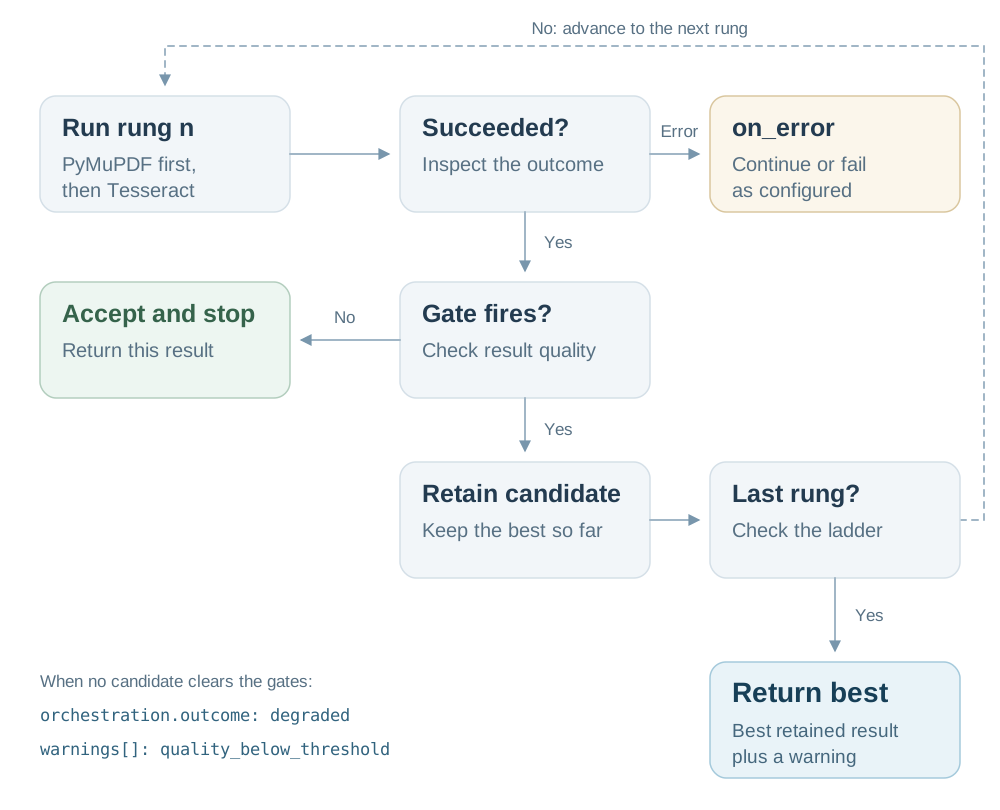
This diagram shows the general cascade, including what happens when the final rung has a gate.
Plain leaves its final rung ungated, so scan_aware accepts Tesseract's successful result without another quality check.
Step 12 shows how longhand lets you add that final check.
Open diagram at full size
A result that fails a gate is kept rather than thrown away. When the rungs run out, the best
retained result comes back with orchestration.outcome: degraded and a quality_below_threshold
warning. Silence is never an outcome.
replay executes the strategy again using recorded decisions, and it calls the selected backends again.
It needs no LLM call, but it is offline only when those backends are local.
Hosted backends can incur fresh charges, and replay refuses a trace whose configuration hash has changed.
resume instead uses the run journal to pick an interrupted run back up, and
step 16 arms it.
try is sequential. Two other Plain keys run backends at the same time.
yaml
version:1policy:backends: [pymupdf, tesseract]
strategies:scan_aware:try: [pymupdf, tesseract]
escalate_when:looks_badmax_time:"2m"quickest:race: [pymupdf, tesseract] # both at once, first success wins, cancel the restduel:compare: [pymupdf, tesseract] # both at once, keep whichever passes more quality checks
Write that file, then validate it. strategy list shows your strategies next to the four presets
that ship with OpenReading:
bash
uv run openreading strategy validate
uv run openreading strategy list
raced_lost means Tesseract was cancelled once PyMuPDF finished. A race has no gates, so no gate
rows appear. Use it when latency is what you are buying.
compare: runs both to completion and keeps the result with the highest fraction of applicable quality checks passed.
The default quality bundle asks four questions: is this a scan, is the text garbled, are too
many pages near-empty, and is the backend's own confidence low. None of the four checks the output
against what the document actually says, so two clean results tie. A tie goes to the cheaper
backend by its descriptor's estimated rate, and then to whichever you listed first.
An unavailable measurement is excluded from the fraction, so missing confidence does not penalize PyMuPDF.
The interesting flag here is --keep-candidates, which retains the loser so you can diff the pair
from one run:
bash
uv run openreading parse examples/schedule_a_2024.pdf --strategy duel --keep-candidates > duel.json
uv run openreading explain duel.json
uv run openreading compare --from duel.json --format table | head -10
That is the same comparison you ran by hand in step 6, from a single command. judged_lost is the
whole record of the choice, and jq '.orchestration.decisions' duel.json prints []. A plain
quality-bundle selection leaves no decision record, so what you can audit is which backend won,
which lost, and under which category.
[!WARNING]
A race: and a compare: both start every backend listed. With local backends that uses
nothing but your own CPU. With a hosted backend, every branch that runs is a call on your key,
losers included. The trace names each one; core quotes no price for any of them.
Escalate when the readings disagree
Add then when a disagreement should send the document to a third backend.
This optional example uses the two local parsers first and names AWS Textract as the fallback:
Save this as comparison.yaml, leaving the walkthrough's openreading.yaml unchanged.
You can inspect it without AWS credentials or a vendor call:
bash
uv run openreading strategy validate --config comparison.yaml
uv run openreading strategy show compare_then --config comparison.yaml --longhand
Executing the fallback requires your AWS configuration and can incur vendor charges.
The disagree check uses the text-token calculation, not the full comparison report.
This explicit escalate_when replaces the default gate rather than adding to it.
With then but no explicit checks, compare escalates when either disagree or looks_bad fires at its defaults.
Without then, it selects a result without an escalation destination.
The four presets are strategies you can run by name without writing a file at all:
Preset
What it does
offline_first
PyMuPDF, then Tesseract, then Docling when gates fire or attempts fail. Docling sends documents to your configured endpoint; the default backend list does not enforce locality
cost_saver
PyMuPDF, then Docling, then AWS Textract when gates fire or attempts fail
fast
race the two local parsers, keep the first success
max_accuracy
AWS Textract, then Azure Document Intelligence when quality gates fire or the first attempt fails
bash
uv run openreading parse examples/1040-1988.pdf --strategy offline_first | jq -r '.backend.id'
uv run openreading strategy show offline_first        # what it actually says
One shorthand becomes three alternative conditions.any_of means any condition can fire.
The scan condition contains two predicates joined by all_of, so the compiled gate has four predicates in total.
The exact measurements and defaults explain each name and threshold.
The scan pair needs both measurements.scanned_pages_detected inspects the input PDF,
while chars_per_page_below checks the response's mean extracted characters per page.
The scan condition fires only when both match; a scan alone is not a failure.
The gate hangs on pymupdf only. Plain puts its gate on every nonfinal backend step in this cascade.
A referenced strategy runs its own rules, not the outer gate, and validation warns about that exception.
The final backend's successful result is accepted without another Plain quality gate.
An explicit gate on the final step in longhand can still fire.
max_time became a budget: on the root. The budget covers the whole strategy rather than one
rung.
strategy normalize prints every strategy in your file as this explicit tree, without running a backend.
Read _compile_gate
for the shorthand mapping and evaluate_gate
for the boolean evaluation. Tuning looks_bad shows how to change the resulting thresholds.
Seeing the plan before you run it
strategy plan prints the compiled tree and the policy's candidate chain, and executes nothing:
bash
uv run openreading strategy plan examples/1040-1988.pdf --strategy scan_aware
eligible is the chain your policy: block resolves to, and dropped is empty because nothing
excluded a backend. A strategy step that names a backend outside that list still runs: naming is
an explicit act, and the list is the default chain rather than a wall. openreading backends is
how you check the named one can actually run here.
That is the ordering rule of the whole system. A named strategy backend is explicit, while a null
backend resolves the configured default chain.
The advanced grammar in one paragraph
Longhand gives you five node kinds. A leaf runs one backend. steps: is a cascade that runs its
children in order. parallel: runs them at once and picks one, with pick: fastest or
pick: best. route: dispatches on facts known before parsing. decide: names a choice an LLM
may take, while the engine keeps a safe default. Beyond the nodes there are per-rung on_error:
handling, budget: and limits:, a review_if: gray band where accepting or escalating becomes
a decision rather than a rule, and shadow: true for a backend that runs and is recorded but is
never allowed to win.
Read the whole language when you need it, and not before:
bash
uv run openreading strategy --help# the language, in one page
uv run python -m pydoc openreading.strategies.model # the full grammar
uv run python -m pydoc openreading.strategies.plain # every Plain word and what it desugars to
uv run python -m pydoc openreading.strategies.signals # every threshold and where its default came from
uv run python -m pydoc openreading.strategies.presets # the cookbook
openreading.strategies.signals is the one to read before you change a number. It gives each
signal's formula, the cut its default sits at, the field-tested source behind that cut, and the
failure that signal is known to have. It is what makes garbled obs=0.0381 thr=True readable.
When you would rather measure a threshold than pick one, calibrate runs your first rung over a
sample of your own documents and proposes an escalate_if: block. It never rewrites your file
(Strategies).
Your duration_ms will differ, because it is wall-clock time on your machine.
The total is six because this folder holds a README as well as five PDFs. Every source is offered
to the backend, so the .md comes back as a FAILED item carrying PyMuPDF's own reason,
unsupported_format, rather than being filtered out before it was ever tried. The count you get
back always accounts for every file you pointed at.
Each entry under items[] carries the source's path and its SHA-256, so a result can be traced
back to the exact bytes that produced it:
A batch takes a strategy exactly as a single file does, which is the shape you would actually run
over a corpus. This one escalates only the scan, so it takes about as long as one OCR run:
One command, five documents, and one of them routed to OCR on its own evidence. explain reads a
batch as well as a single run, naming each document as it goes:
bash
uv run openreading explain batch-strat.json | head -20
Three flags matter once a folder gets real.
--jobs N runs N documents at once. The default is 1, which is serial and safe against a
vendor's rate limit. Concurrency changes how long a folder takes and never what it costs.
--save-dir DIR also writes each successful response to DIR/<relpath>.json, which is what
compare reads when you want a corpus-level verdict.
--max-items N caps how many files a glob may expand to, at 200 by default, and exceeding it
exits before anything runs.
Run two backends over the same folder, then compare the corpora. The Tesseract sweep OCRs the
five-page scan, so it takes about half a minute:
bash
uv run openreading parse examples/ --backend pymupdf   > mu-corpus.json
uv run openreading parse examples/ --backend tesseract > te-corpus.json
uv run openreading compare mu-corpus.json te-corpus.json --format table
That is a per-document verdict over a whole corpus in one screen. The two bank statements come
back equivalent, the two born-digital tax forms mixed because only PyMuPDF found their tables,
and the scan divergent because the two backends read entirely different things from it.
Two batch results pair their documents by relpath, so name each run after the backend that
produced it. The labels in the report come from the filenames.
Your own documents belong in samples/ at the clone root, which is gitignored for exactly that.
scripts/batch_demo.sh reads that folder by default, parses it with both local backends, and
compares the two runs.
This step is optional. Skip to step 15 to finish the walkthrough without a vendor account.
Everything so far ran on your machine. A hosted backend works as soon as its vendor key is in
.env and you select it. Charges land on your own account with that vendor.
Your .env file persists on disk, and the credential broker reads it into the process environment.
Try the hosted backend without a key and the command stops before anything is sent:
bash
uv run openreading parse examples/schedule_a_2024.pdf --backend reducto
text
[reducto] missing required credentials/config: REDUCTO_API_KEY. Sign up / configure: https://platform.reducto.ai
The exit code is 3, and nothing left the machine. Check credentials for every backend at once:
bash
uv run openreading backends --check reducto
text
BACKEND                        PROBE      STATUS                 MEASURED  LATENCY   DETAIL
reducto                        none       not_configured         no        -         not configured: set REDUCTO_API_KEY
That is the result without a key. With a key already set, the probe can contact the vendor.
Create a private .env file, then open it in your editor to keep the key out of shell history:
bash
touch .envchmod 600 .env
Add your actual key in the editor, replacing the placeholder in this line:
dotenv
REDUCTO_API_KEY=your-actual-key
Then check readiness:
bash
uv run openreading backends | grep reducto
text
reducto hosted_api yes -
Two things about that file are worth knowing before you use it.
.env is already in this repository's .gitignore, so a file you write inside a clone is not
committed by accident.
Never run cp .env.example .env. That file ships DOCLING_SERVE_URL and QWEN_VL_ENDPOINT
with values rather than blanks, so a copy marks two backends configured on a machine where
neither is running. A strategy that reaches Docling then attempts http://localhost:5001 and
records a connection error. Without that endpoint configured, it skips Docling for missing credentials.
.env.example is the per-variable reference, one commented block per backend
with the signup URL in its header:
docling and qwen-vl are services you run
yourself, so their variables point at your own container or endpoint and there is no signup link.
Your openreading.yaml from step 8 lists only local backends, so a request that names none will
never reach Reducto. Read Reducto's own terms and confirm your own agreements before you send it
anything, because core makes no claim about a vendor and never did.
When you are ready, save this as hosted.yaml. Keep openreading.yaml from step 8 for the
remaining local exercises:
yaml
version:1policy:backends: [pymupdf, reducto] # this file's chain: local first, hosted secondstrategies:cheap_first:try: [pymupdf, reducto] # local first, hosted only when the local read is badescalate_when:looks_bad
Inspect that file explicitly, without running either backend:
bash
uv run openreading strategy validate --config hosted.yaml
uv run openreading strategy plan examples/1040-1988.pdf --strategy cheap_first --config hosted.yaml
To execute it later, use parse --strategy cheap_first --config hosted.yaml with your document path.
Before you run something against a hosted key, ask what it would do:
bash
uv run openreading help usage
The envelope answers the same question afterwards. usage reports what each backend consumed in
the unit it meters in, and orchestration.attempts[] names every attempt that ran, winners and
losers alike, so you can count the calls. Neither carries a price. Join those counters to your own
provider invoice, which is the only rate card that knows your tier.
Which variables a backend reads, and which one wins when two are set, is one command:
bash
uv run python -m pydoc openreading.credentials
An OPENREADING_<SLUG>_<KEY> form beats the vendor's own variable, so
OPENREADING_REDUCTO_API_KEY beats REDUCTO_API_KEY. A .env file never overrides a variable
your shell already exported.
openreading serve puts the same engine behind an HTTP API on your own machine. It is a process
you start, not a service anyone else runs for you. The [server] extra is included in the
uv sync --all-extras --dev from step 1.
Requests may name a local file by path only beneath a root you nominate, so set that root when you
start it:
bash
OPENREADING_SERVER_PATH_ROOT="$PWD" uv run openreading serve
text
[serve] listening on http://127.0.0.1:8787. Readiness: GET /healthz
INFO:     Application startup complete.
That is the envelope from step 3, field for field, over HTTP. The policy question answers over
HTTP too. The server reads one openreading.yaml, from OPENREADING_CONFIG, and never sniffs its
working directory: a stray file next to a long-running process must not change which backends it
reaches. Point it at the file from step 8 and ask for the chain with no backend named:
That is your file's list, over the wire. backend.id: null means "resolve the chain"; naming a
backend runs that backend. The boundary that refuses one is OPENREADING_API_KEY_SCOPES, covered
by openreading help serve.
The endpoints you will use first:
Endpoint
Does
GET /healthz
readiness, and the package version answering you
GET /v1/backends
the backends table as JSON, with ready per backend
POST /v1/parse
one document, one envelope; blocks until the result is ready
POST /v1/batch
many documents, one batch-result
POST /v1/route
the plan only, nothing executed
POST /v1/compare
a comparison report over envelopes you already have
POST /v1/jobs, GET /v1/jobs/{id}
start a long parse and poll it, instead of blocking
Four things about the server differ from the CLI, and each one has a reason.
It never reads ./openreading.yaml from its working directory. A stray file next to a
long-running process must not change which backends it may reach. Point it at a config
explicitly through OPENREADING_CONFIG.
document.path is refused unless OPENREADING_SERVER_PATH_ROOT is set, and then only
beneath that root. A request from elsewhere sends bytes_base64 or a URL.
POST /v1/batch takes no path. Each document is bytes_base64, url or file_id.
Credentials come from the server's own environment, through the same broker as the CLI. A key
never travels in a request body.
Authentication is off by default and on the moment you set OPENREADING_API_KEYS. Bind to
127.0.0.1, which is the default, until you have. uv run openreading serve --help documents
--host, --port, --cors-origin and --env-file, and
The HTTP server covers jobs, webhooks, the status ladder and
the security rules in full.
The same three verbs are also a Python import, with no server in the way:
python
import openreading
doc = "examples/schedule_a_2024.pdf"
resp = openreading.run(doc, backend="pymupdf") # a dict, the same envelopeprint(resp["status"]["state"], resp["backend"]["id"]) # succeeded pymupdf
plan = openreading.route(doc) # reads ./openreading.yamlprint(plan.eligible_ids[0]) # pymupdf
delta = openreading.compare([resp, openreading.run(doc, backend="tesseract")])
print(delta["headline"]["verdict"]) # mixed
The exit code is the stream a script reads. Branch on it before parsing anything.
Code
Means
Typical cause here
0
success
a completed local parse
1
unexpected error, or a batch where nothing succeeded
a bug, or an empty folder
2
usage
an unknown --backend, a path that does not exist, more files than --max-items
3
cannot run
a missing key, a refused feature, an unreadable config, or replay refusal
4
route found no backend; a batch was partial
an empty default chain, or one failed document
5
compare inputs are not valid responses
comparing the wrong files
6
interrupted and resumable
Ctrl-C during a strategy run with the journal armed
130
interrupted without a journal
Ctrl-C before you arm the ledger
143
terminated without a resumable run
SIGTERM before you arm the ledger
Two failures you can reproduce right now, each exiting 3:
bash
uv run openreading parse examples/README.md --backend pymupdf
# [pymupdf] unsupported_format: pymupdf does not read .md. It reads cbz, epub, mobi, pdf, svg, xps.
uv run openreading parse examples/schedule_a_2024.pdf --backend pymupdf --extract
# [pymupdf] unsupported feature (custom_schema_extraction): pymupdf cannot perform schema-driven# field extraction; route to an extraction-capable backend (e.g. google-document-ai, reducto)
Each message names the thing that is missing rather than failing generically. The second one is
worth noticing: asking a backend for something it cannot do refuses the run instead of quietly
returning less than you asked for.
Exit 0 is not the same as "everything was read." On a batch, read summary.failed. On a
strategy run, read orchestration.outcome and warnings[].
Making a long run resumable
A journal stores a strategy run's events and payloads so interrupted work can resume.
Set OPENREADING_LEDGER to a directory and every step of a strategy run is journaled there. There
is no flag for this on purpose, because arming a journal writes document payloads to disk and that
is an environment decision rather than a per-run one.
bash
export OPENREADING_LEDGER=./.openreading/tutorial
uv run openreading parse examples/1040-1988.pdf --strategy scan_aware > run.json
ls .openreading/tutorial
text
<run-id>.header.json <run-id>.jsonl blobs/
Interrupt a run while that is armed, with Ctrl-C or a supervisor's SIGTERM, and the command exits 6
and prints a run id. Pick it back up with that id:
bash
uv run openreading resume RUN_ID > resumed.json   # replace RUN_ID with your printed run id
uv run openreading explain resumed.json
Resume reuses recorded step outcomes, including cancellations, so inspect the resumed trace and its quality warnings.
Interrupting this example during OCR can leave Tesseract recorded as cancelled. Resume then returns the retained PyMuPDF result with outcome: degraded.
Start a new parse --strategy scan_aware run on the scan when you need the cancelled OCR attempt to run again.
Two limits are worth knowing before you rely on it. A --backend run journals nothing, because
only a strategy dispatch has decisions worth replaying. A batch prints no single run id, so
batch-level resume is out of scope. Without the variable set, nothing is written and there is
nothing to resume. The run ledger explains the plaintext
files it records and the operator-owned retention policy.
bash
uv run openreading help signals      # Ctrl-C, SIGTERM, and what a stopped run leaves behind
uv run openreading help exit-codes   # every code, in full
You have now parsed, compared, routed, and orchestrated documents through the main user surfaces. Each question below leads to
one guide, and each guide demonstrates rather than restates.
You want to…
Read
see all the documentation, and how an agent uses it
One file, one policy, three strategies. This is the file steps 8 through 13 assembled.
Save it as openreading.yaml before running the appendix commands, including if you already ran cleanup.
yaml
version:1# ── Default backend chain. Explicit backend names still run directly. ──policy:backends: [pymupdf, tesseract]
# ── Strategies. Named plans over explicitly selected backends. ──strategies:# The workhorse. Cheap local parse first, OCR only when the first result cannot be trusted.scan_aware:try: [pymupdf, tesseract]
escalate_when:looks_badmax_time:"2m"# Lowest latency. Both at once, first success wins, the loser is cancelled.quickest:race: [pymupdf, tesseract]
# Both to completion, keep whichever passes more quality checks. Pair with --keep-candidates.duel:compare: [pymupdf, tesseract]
bash
uv run openreading strategy validate                                    # is it well formed
uv run openreading strategy show scan_aware --longhand                  # what it compiles to
uv run openreading strategy plan examples/1040-1988.pdf --strategy scan_aware   # what it would do
uv run openreading parse examples/ --strategy scan_aware --jobs 4 > all.json    # do it
uv run openreading explain all.json                                     # why it did that
 openreading